Sunday Session Private Podcast Feed Instructions

Thanks for your interest in listening to Tara’s Sunday Sessions!

This podcast feed is private for our community, so you will need to manually add the podcast URL to your podcast app.

We’ve included the instructions for Apple Podcasts app below, as well as a full list of iOS and Android podcast apps that allow you to add private feeds. If you aren’t familiar with any of these apps, you can download the Castos app to your mobile device for either iOS or Android (Castos is our private podcast host).

The Sunday Sessions private podcast feed URL is: https://sunday-sessions-with-tara-mohr.castos.com/feed?uuid=6261cdcd4739a
(you will need this URL no matter which app you are using)

If you get require technical help, you can contact our team here for assistance.
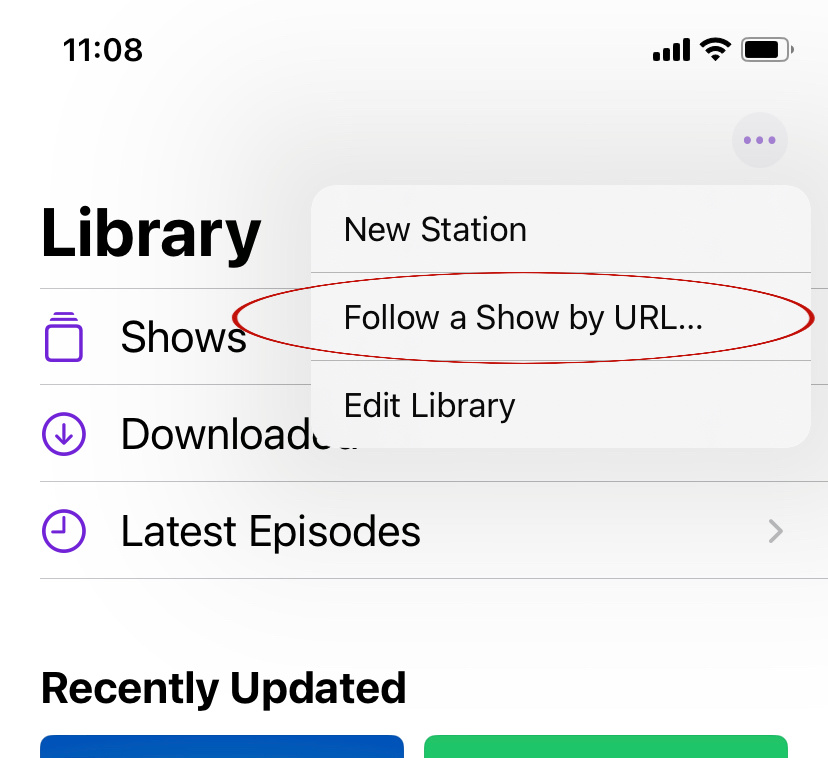
How to add the Sunday Sessions private podcast feed to your Apple Podcasts app:

Step #1
Go into your Apple Podcasts app Library (the Library icon is at the bottom of your podcast app screen).

Step #2
Click on the three dots in the top right corner and select “Follow a Show by URL” (see screenshot).

Step #3
Copy/paste the following URL into the field “Podcast URL”: https://sunday-sessions-with-tara-mohr.castos.com/feed?uuid=6261cdcd4739a

Podcast Apps that Allow You to Add Private Feeds:

These iOS podcast apps allow you to add private feeds:
Apple Podcasts
Castos
Google Podcasts
Castbox
Overcast
Pocket Casts
Downcast
Castro
Google Podcasts

These Android podcast apps allow you to add private feeds:
Castos
Google Podcasts
Castbox
Pocket Casts
Podcast Addict
Podcast Republic
Player FM (register for an account first)
Dog Catcher
Beyond Pod
Podcasty
PodKicker

These podcast apps do NOT support private podcasts:
Spotify
Google Play
Stitcher
iHeartRadio
Acast
Podcast App
PodcastOne
DoublePod
PodcastHD
Podcast Guru

You can find instructions for some of the iOS and Android apps listed above here.

We're on a mission to help you realize your playing big dream.
Dive into our resources here: